Role concept
Myra AI Workspace has seven system roles. Each user account has exactly one of them. The role decides which entries the navigation bar shows and which requests the server accepts.
The permissions of a role come from a catalog of 38 permissions. Each permission belongs to a module and to a class. The class decides which roles get the permission. The navigation bar hides entries. Each view and each interface examines the permission again on the server.
The following information and options are available in a table:
| Role | Permissions | Description |
|---|---|---|
| Administrator | 38 | Manages the platform and all tenants. |
| Tenant Administrator | 25 | Manages one tenant completely. |
| AI Manager | 10 | Controls the agents, the governance, and the groups of a tenant. |
| Member | 5 | Works with the AI every day and creates own objects. |
| Finance | 3 | Examines the costs and manages the billing settings. |
| Viewer | 0 | Examines the workspace without working in it. |
| Demo User | 0 | Runs a limited demonstration without a user account. |
Assigning roles
The user who manages the users assigns a role. Which roles are available depends on the role of that user.
The following information is available:
| Own role | Assigns the roles |
|---|---|
| Administrator | All seven roles. |
| Tenant Administrator | AI Manager, Member, Finance, and Viewer. |
| AI Manager | None. |
| Member | None. |
| Finance | None. |
| Viewer | None. |
| Demo User | None. |
Custom roles
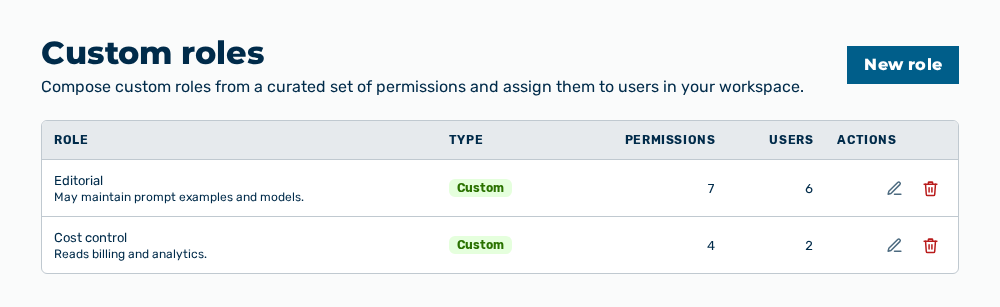
Custom roles view
The Administrator and Tenant Administrator roles also compose custom roles. To do this, they select individual permissions from the catalog in the Roles & permissions view. Then they assign the completed role to users in the workspace.
The permissions of the platform are not available for selection. These permissions stay reserved for the Administrator role.