My Commands tab
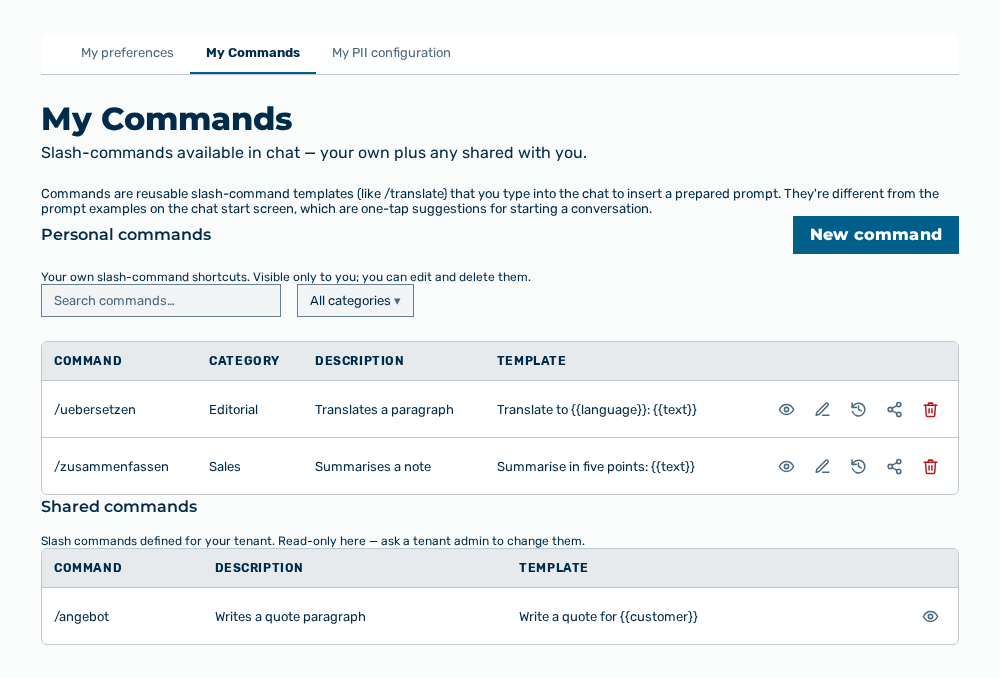
My Commands tab
The tab carries this note: Commands are reusable slash-command templates (like /translate) that you type into the chat to insert a prepared prompt. The tab contains the Personal commands and Shared commands sections.
The following information is available in both sections:
| Column | Description |
|---|---|
| Command | Name of the slash-command with a leading slash, for example /translate. |
| Category | Category of the command. Without a category, the column shows —. The column appears in the Personal commands section only. |
| Description | Short description that appears in the picker of the chat. Without a description, the column shows —. |
| Template | Prompt of the command. The column truncates long templates. The View row action shows them in full. |
The following options are available:
| Option | Description |
|---|---|
| New command button | Opens the New Command dialog. |
| Search commands… input field | Searches in the personal commands. |
| Filter by category drop-down list | Limits the list to one category. The drop-down list contains the categories of the shown commands and the All categories entry. |
| View row action | Opens the Command — / |
| Edit row action | Opens the Edit Command dialog. The row action is available for your own command only. |
| Versions row action | Opens the Version history — / |
| Share row action | Opens the Share / |
| Delete row action | Opens the Delete this command? confirmation. The row action is available for your own command only. |
| Manage tenant commands button | Opens the tenant view in which the shared commands are maintained. The button appears for the Tenant administrator role only. |
| Shared with you label | Marks a row that another person shared with you. Such a row carries the View row action only. |
Note
The Personal commands section carries this note: Your own slash-command shortcuts. Visible only to you; you can edit and delete them. The Shared commands section carries this note: Slash commands defined for your tenant. Read-only here — ask a tenant admin to change them.
Note
If no own command exists yet, the section shows No commands yet. Create one to use /commandname shortcuts in chat. If the search finds nothing, the section shows No matches for "