Detail view of a project
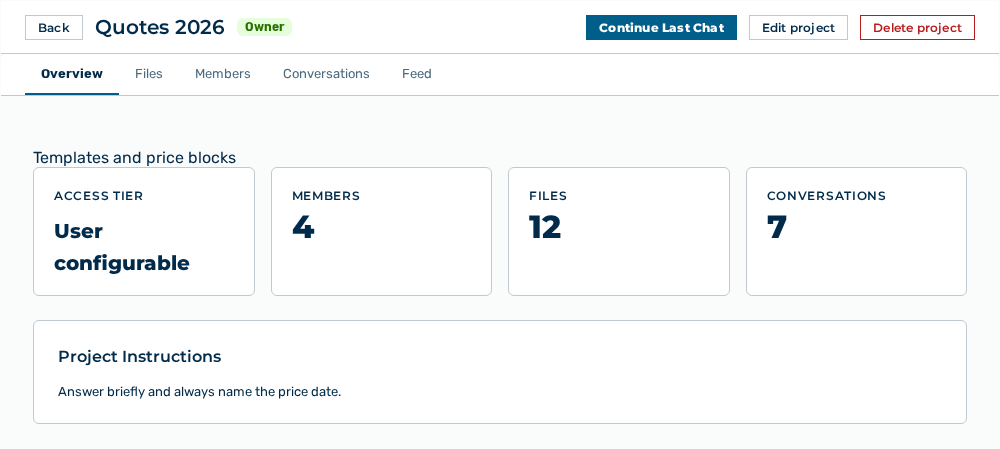
Detail view of a project
The detail view lists the content of a project in tabs. If the project no longer exists, the view shows Project not found.
The following information is available:
| Tab | Description |
|---|---|
| Overview | Shows the description, the key figures, the access tier, and the project instructions of the project. |
| Files | Lists the knowledge files that the model reads on demand. The counter of the tab counts only the files you can see. Some may be private to their creator until a chat is shared. |
| Members | Lists the users of the project with their project role. |
| Conversations | Lists the conversations that are assigned to the project. |
| Feed | Lists, under the Project Feed title, the conversations that project members shared. |
The following options are available:
| Option | Description |
|---|---|
| Back button | Returns to the list of the projects. |
| Start Chat button | Opens a new conversation in the context of the project. |
| Continue Last Chat button | Opens the conversation of the project used last. |
| Edit project button | Opens the form with the data of the project. See the Editing a project section. |
| Delete project button | Opens the Delete Project? dialog. See the Deleting a project section. |
| Share with organization button | Releases the project in the Members tab to all users of the organization. After the release, the button shows Shared with organization — unshare. |
Next to the name of the project, the view shows your project role as a badge.
Note
The Edit project button appears for the Owner and Editor project roles and for the Administrator role. The Delete project button, the administration of the members, and the Conversation retention (days) field appear only for the Owner project role and for the Administrator role.
Note
If your organization switched off sharing with the whole organization, the view shows Sharing with the whole organization is switched off for your organization. Ask an administrator to enable it.