More options menu
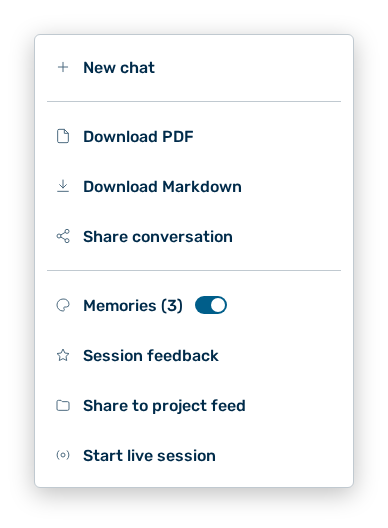
More options menu
The menu behind the More options button in the header holds the actions for the running conversation. Without a running conversation the menu holds the Memories entry only.
The following options are available:
| Option | Description |
|---|---|
| New chat entry | Starts a new conversation. The previous conversation remains available under Recent chats. |
| Download PDF entry | Downloads the conversation as a PDF file. During the generation the entry carries the Generating PDF… label. As long as the conversation holds no message, the entry is not available. |
| Download Markdown entry | Downloads the conversation as a Markdown file. As long as the conversation holds no message, the entry is not available. |
| Share conversation entry | Opens the Share conversation dialog. See the Share conversation dialog section. In ghost mode the entry does not appear. |
| Memories entry | Sets whether the conversation uses your saved memories. If memories exist, the entry carries their number as Memories ( |
| Session feedback entry | Opens the feedback on the session. In ghost mode the entry does not appear. |
| Share to project feed entry | Shares the conversation in the feed of the project. If it is shared already, the entry carries the Remove from project feed label. The entry appears in a conversation that belongs to a project only, and not in ghost mode. |
| Start live session entry | Opens the conversation for the collaboration of the project members. While the session runs, the entry carries the Stop live session label. The entry appears in a conversation shared in a project only, and not in ghost mode. |
Note
The Share to project feed entry carries the note Also makes this chat's generated files visible to project members.
Note
In a conversation the More options button carries the number of your memories as a badge. From ten memories on, the badge carries the value 9+.
Note
If the live session cannot be changed, the view states Couldn't change the live session. The conversation may no longer be shared in a project.
Note
In the Demo user role the export as PDF and as Markdown, the memories, and the live session are not available.