Add files, photos, or options menu
Add files, photos, or options menu
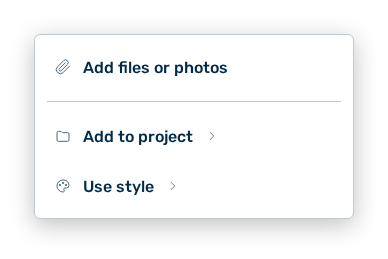
The menu collects everything you give a message in addition. You switch the web search on in the header of the view, not here.
The following options are available:
| Option | Description |
|---|---|
| Add files or photos entry | Opens the file selection and attaches the selected files to the message. |
| Add to project entry | Opens the Select project list and assigns the conversation to a project. |
| New project name input field | Creates a new project with the Create button and assigns the conversation to that project. |
| Use style entry | Opens the Select style list with the answer style of the AI. |
| Back entry | Leads from a sub-list back into the main menu. |
The following answer styles are available:
| Style | Description |
|---|---|
| Personal style | Applies your profile writing style. |
| Concise | Short, direct answers. |
| Explanatory | Step-by-step walkthroughs. |
| Formal | Professional register, no contractions. |
| Casual | Friendly, conversational tone. |
Note
If you assign the conversation to a project, Myra AI Workspace asks Move this conversation to
Note
If no project exists yet, the list shows No projects yet. While loading it shows Loading projects…, on an error Couldn't load projects.