Connections
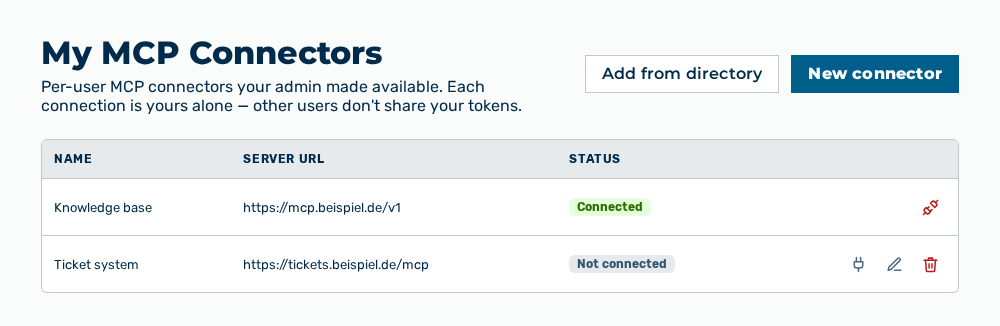
My MCP Connectors view
For your role, the Connections group opens the My MCP Connectors view directly. The view connects servers for the Model Context Protocol (MCP) so the AI calls their external tools in the chat. Each connection is yours alone. Other users do not share your tokens.
The following information is available:
| Column | Description |
|---|---|
| Name | Name of the connector. For a connector from the directory, the icon of the service comes first. |
| Server URL | Address of the MCP server that the connector calls. |
| Status | State of your personal connection. The Connected value stands for a stored access token. The Ready value stands for a connector that works without a sign-in. The Not connected value stands for a missing access token. The Reconnect needed value stands for an expired access token. A row with an expired token has a red background. |
The following options are available:
| Option | Description |
|---|---|
| Add from directory button | Opens the Connector directory dialog. |
| New connector button | Opens the New MCP Connector dialog. |
| Connect row action | Opens the Connect |
| Reconnect row action | Opens the same dialog again. The row action appears if the status is Reconnect needed. |
| Disconnect row action | Opens the Disconnect " |
| Edit row action | Opens the Edit MCP Connector dialog. The row action appears for a connector that you created yourself only. |
| Delete row action | Opens the Delete " |
Note
If no connector is set up yet, the view shows No per-user connectors are set up for this tenant yet. Register one with + New connector or Add from directory, or an administrator can provide one under MCP Connectors.
Note
If the AI is to call a tool of a connector that is not connected, the chat shows
Note
The Viewer role creates no MCP connectors. For the Demo User role, the view is not available.
The following sections describe the view in detail: