Configurations tab
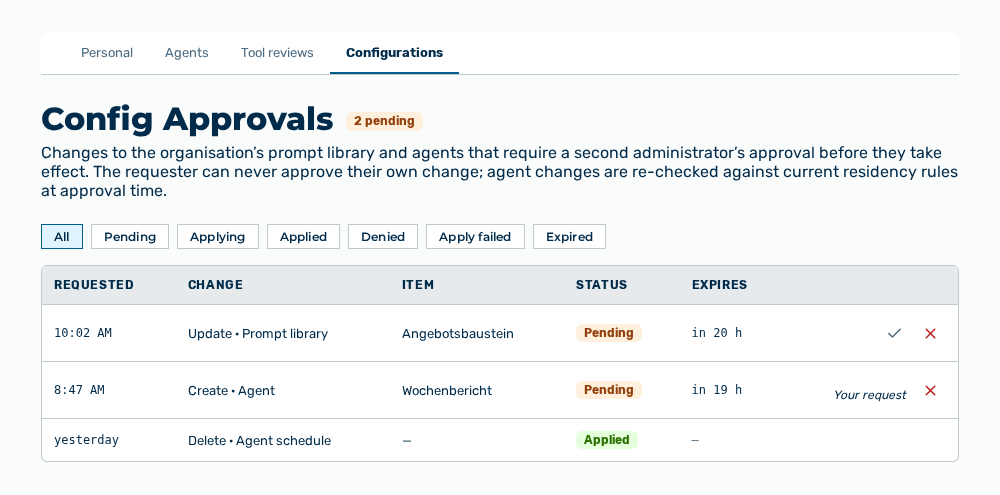
Configurations tab
The tab carries this note: Changes to the organisation's prompt library and agents that require a second administrator's approval before they take effect. The requester can never approve their own change; agent changes are re-checked against current residency rules at approval time.
The following information is available:
| Column | Description |
|---|---|
| Requested | Time at which the change was submitted. |
| Change | Kind of the change and object affected, for example Update · Prompt library. As the change, Create, Update, Delete, and Restore appear. As the object, Prompt library, Agent, Agent schedule, or Project. |
| Item | Name of the entry affected. Without a name, the column shows —. |
| Status | Pending, Applying, Applied, Denied, Apply failed, or Expired. |
| Expires | Time at which the approval expires. For an approval decided already, the column shows —. |
The following options are available:
| Option | Description |
|---|---|
| All, Pending, Applying, Applied, Denied, Apply failed, Expired buttons | Limit the list to one status. |
| Approve row action | Applies the change. Myra AI Workspace applies it in one step and sets the status to Applied. |
| Deny row action | Discards the change. The entry stays unchanged. |
| Your request label | Marks a row that you submitted yourself. The Approve row action does not appear there. |
Note
Myra AI Workspace enforces the four-eyes principle server-side. The requester never approves their own change. The Deny row action stays available to them so that they can withdraw the request.
Note
Myra AI Workspace re-checks an agent change against the current residency rules at approval time. If the change cannot be applied, the row carries the Apply failed status.
Note
If no approval exists, the tab shows No config approvals yet. With a filter set, it shows No approvals with status “