Platform admins
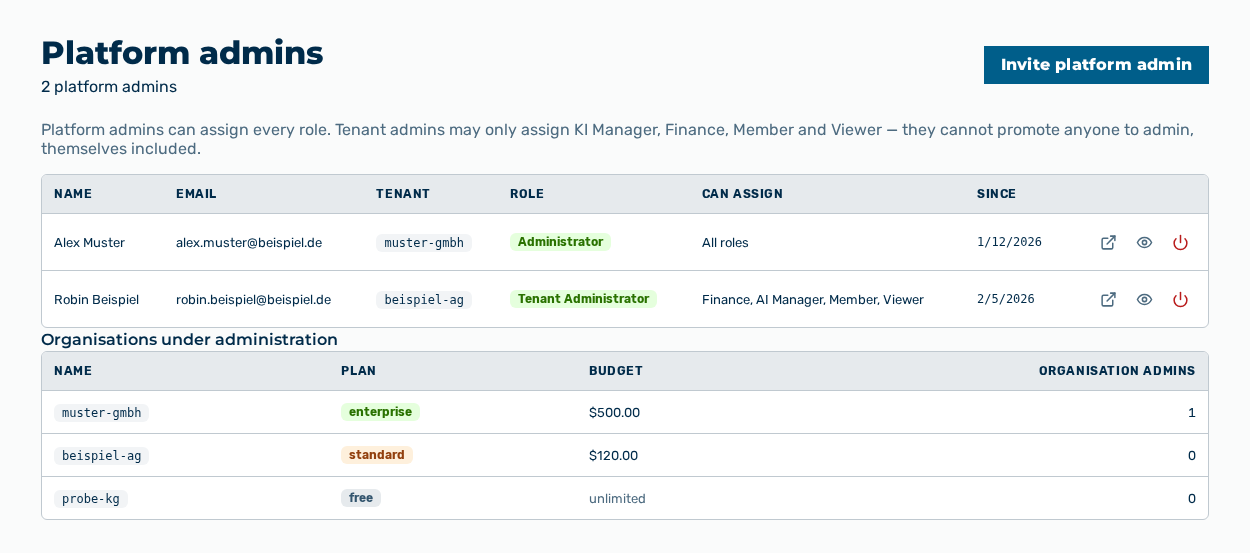
Platform admins view
The Platform admins view shows the user accounts with the Administrator and Tenant Administrator roles across all tenants. The subtitle of the view gives the number of these accounts. Below the list, the view shows the organisations under administration.
The following information is available:
| Column | Description |
|---|---|
| Name | Name of the user. If the account carries no name, the — entry appears. |
| Email address of the user account. | |
| Tenant | Identifier of the tenant that the user account belongs to. |
| Role | Role of the user account: Administrator or Tenant Administrator. |
| Can assign | Roles that the user account can assign. An administrator carries the All roles entry. |
| Since | Time when the user account was created. |
The Organisations under administration list shows the following information:
| Column | Description |
|---|---|
| Name | Identifier of the tenant. |
| Plan | Plan of the tenant: Free, Standard, or Enterprise. |
| Budget | Tenant budget. If no budget exists, the unlimited entry appears. |
| Organisation admins | Number of the user accounts with the Administrator role in this tenant. |
The following options are available:
| Option | Description |
|---|---|
| Invite platform admin button | Opens the New user dialog with the Administrator role preselected. The button is disabled while no tenant exists. |
| Open → row action | Opens the detail view of the user account. |
| View as user row action | Shows the workspace as this user account sees it. |
| Disable row action | Locks the user account. |
| Enable row action | Removes the lock from a disabled user account. |
| Restore row action | Restores a deleted user account. |
| Row of the Organisations under administration list | Opens the detail view of the tenant. |
Note
The view carries the note Platform admins can assign every role. Tenant admins may only assign KI Manager, Finance, Member and Viewer — they cannot promote anyone to admin, themselves included.
Note
The Disable and View as user row actions do not appear for your own user account. The View as user row action appears for the Administrator role only.
Note
The Organisation admins column counts the Administrator role only. The list above it also shows the Tenant Administrator role.