Inbox tab
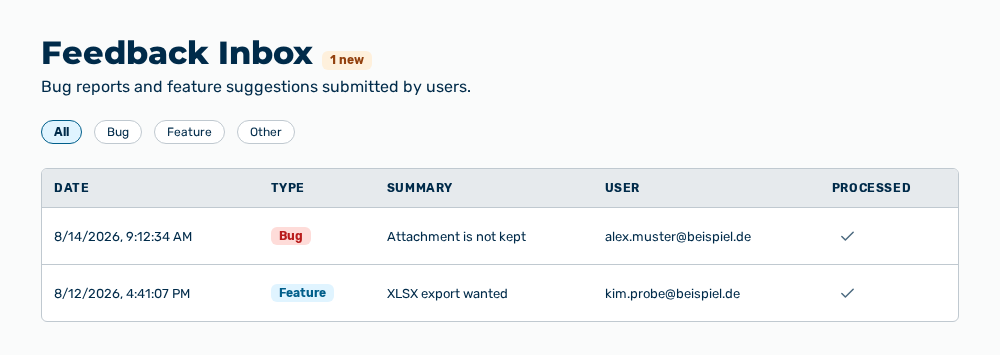
Inbox tab
The tab carries this note: Bug reports and feature suggestions submitted by users. The heading carries the
The following information is available:
| Column | Description |
|---|---|
| Date | Time at which the feedback came in. |
| Type | Bug, Feature, or Other. |
| Summary | One-line description that the person who reported entered. |
| User | Email address of the person who reported. Without an address, the column shows —. |
| Processed | Row action that sets the processing state. |
The following options are available:
| Option | Description |
|---|---|
| All, Bug, Feature, Other buttons | Limit the list to one type. |
| Row of the table | Expands the details of the feedback and collapses them again. |
| Mark as processed row action | Marks the feedback as processed. For feedback processed already, the row action shows Mark as unprocessed. |
| Edit row action | Opens the Edit feedback dialog. The row action is in the row expanded. |
| Delete row action | Opens the Delete the feedback entry ' |
The row expanded contains the following information:
| Entry | Description |
|---|---|
| Description | Detailed text of the feedback. Without a text, the entry shows No additional details. |
| Page: | Address of the page on which the feedback was written. The entry appears only if an address is available. |
| Screenshot: | Images that the person who reported attached. A click on an image enlarges it and another click reduces it again. If an image cannot be loaded, the row shows Could not load the image. |
Note
If no feedback exists, the tab shows No feedback submissions yet. If the load, the save, the deletion, or the marking fails, the tab shows Failed to load feedback., Failed to save the feedback entry., Failed to delete the feedback entry., or Failed to update the feedback entry.