Members
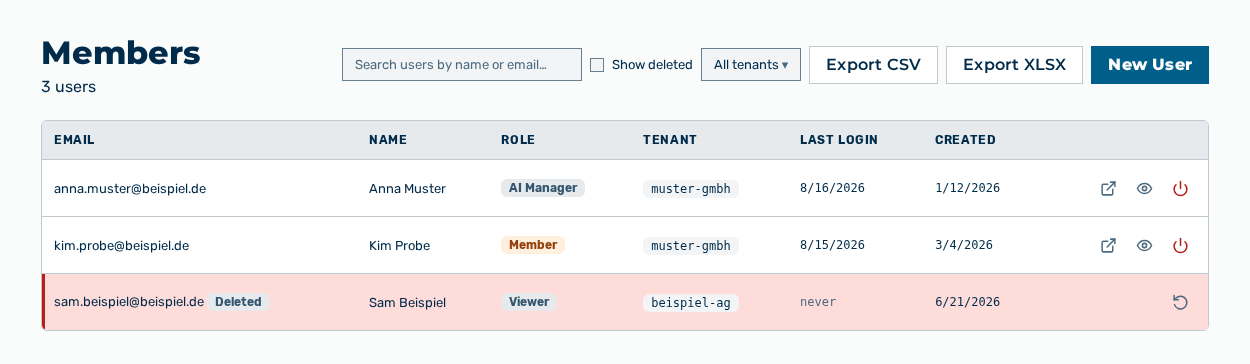
Members view
The Members view administers the user accounts of the tenant and their roles. The subtitle of the view gives the number of the user accounts.
The following information is available:
| Column | Description |
|---|---|
| Email address of the user account. A deleted account carries the Deleted badge, a disabled account the Disabled badge. | |
| Name | Name of the user. |
| Role | Role of the user account, for example Member or AI Manager. |
| Tenant | Tenant that the user account belongs to. |
| Last Login | Time of the last login. If the account never logged in, the never entry appears. |
| Created | Time at which the user account was created. |
The following options are available:
| Option | Description |
|---|---|
| Search users by name or email… field | Limits the list to the user accounts whose name or email address contains the text entered. The field appears as soon as the list holds at least one user account. |
| Show deleted check box | Shows the deleted user accounts with the Deleted badge. |
| All tenants list | Limits the list to one tenant. |
| Export CSV button | Downloads the list as a CSV file with the Email, Name, Role, Tenant, Last Login, Created, and Status columns. |
| Export XLSX button | Downloads the same data as an XLSX file. |
| New User button | Opens the New User dialog. See the Creating a user account section. |
| Column heading | Sorts the list by the column. A further click reverses the sort direction. |
| Per page drop-down list | Sets the number of the rows on each page: 10, 25, or 50. The default is 10 rows. |
| Previous and Next buttons | Move through the list. Between them, the Page |
| Open → row action | Opens the detail view of the user account. |
| View as user row action | Shows the work area in the view of this user account. |
| Disable row action | Blocks the user account. The account then carries the Disabled badge. |
| Enable row action | Releases the block of a disabled user account. |
| Restore row action | Restores a deleted user account. |
Note
The All tenants list appears only for the Administrator role. If no user account exists yet, the view shows No users yet. Create the first user to get started. If the search finds no user account, the view shows No users match "<search text>".
Note
The list does not show the Administrator and Tenant Administrator roles. The Platform admins view shows these user accounts.
Note
Myra AI Workspace keeps the search text and the selected number of the rows on each page. The search text and the number of the rows apply again when you open the view subsequently. A change of the sorting or of the filter moves the list back to the first page.
The following sections describe the view in detail: