Gateways
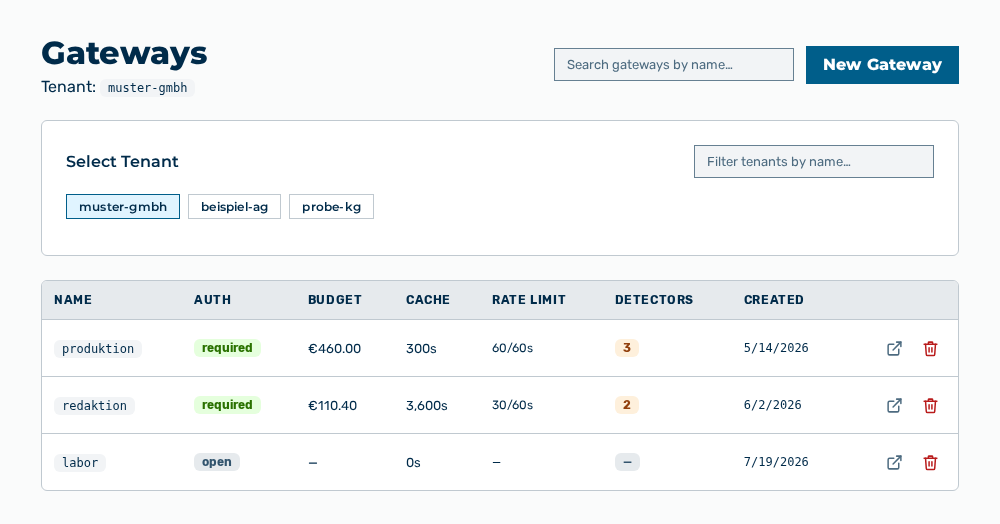
Gateways view
The Gateways view manages the named installations of a tenant. A gateway sets which providers and models are available, which rules apply to the content, which budget applies, and which authentication tokens get access. Above the list, the Tenant: entry names the tenant whose gateways the view lists.
The following information is available:
| Column | Description |
|---|---|
| Name | Identifier of the gateway. The identifier contains lowercase letters, numbers, and hyphens, and is part of the endpoint URL. |
| Auth | Shows whether a request to the gateway must carry an authentication token: required or open. |
| Budget | Spend cap of the gateway. If no budget is set, the — entry appears. |
| Cache | Lifetime of the cache in seconds. The value 0s means that the cache is disabled. |
| Rate Limit | Permitted requests per time window, in the form |
| Detectors | Number of guardrail detectors that are active on the gateway. If no detector is active, the — entry appears. |
| Created | Time at which the gateway was created. |
The following options are available:
| Option | Description |
|---|---|
| Select Tenant selection list | Selects the tenant whose gateways the view lists. The Filter tenants by name… input field narrows the selection. |
| Search gateways by name… input field | Narrows the list to the gateways whose name contains the text you enter. |
| New Gateway button | Opens the New Gateway dialog. See the Creating a gateway section. |
| Open → row action | Opens the detail view of the gateway in the row. |
| Delete row action | Opens the Delete gateway " |
| Quick start guide link | Appears only when the list is empty and opens the quick start documentation. |
Note
If no gateway exists for the tenant yet, the view shows No gateways for
The following sections describe the view in detail: