Managing model prices
A model price gives a model of a provider its cost. Myra AI Workspace uses it for the cost allocation.
Creating a model price
The following requirements are met:
- ☑ Your user account has the Manage model prices and deprecations permission.
Proceed as follows to create a model price:
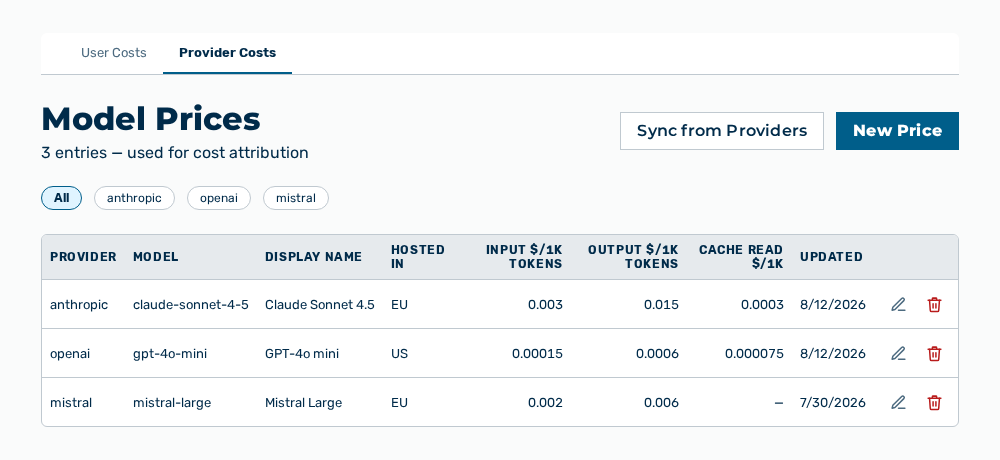
Model Prices view
-
► In the Settings area, open the Costs group.
- ▷ On the start page, click on your name at the bottom of the navigation bar.
- ↳ The user menu opens.
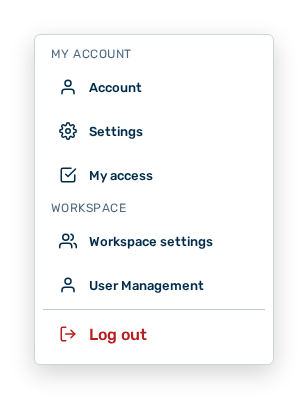
User menu
- ▷ In the My Account group, click on the Settings entry.
- ↳ The navigation bar shows the Settings area.
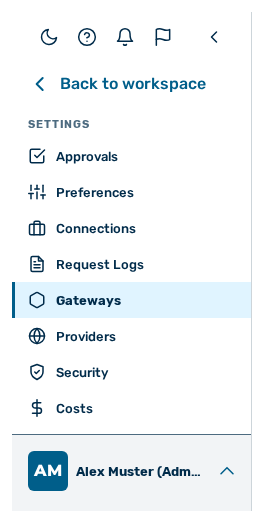
Navigation bar in the Settings area
- ▷ In the navigation bar, click on the Costs group.
- ► Open the Provider Costs tab.
- ► Click on the New Price button.
- ↳ The New Model Price dialog opens.
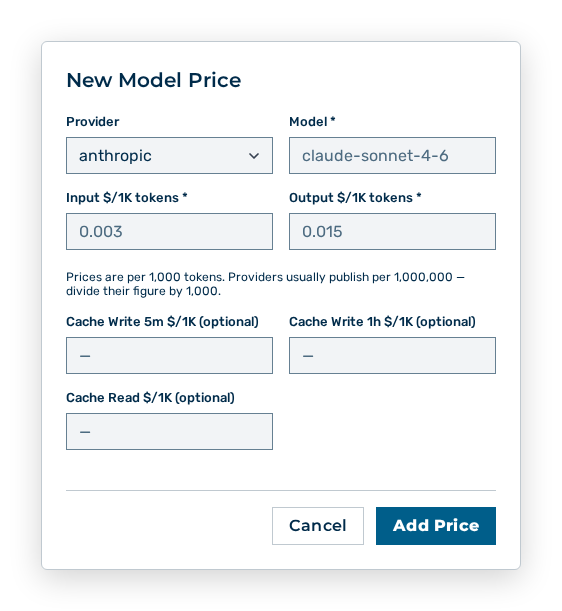
New Model Price dialog
- ► Under Provider, select the provider.
- ► Under Model, enter the identifier of the model.
- ► Enter the prices.
- ■ The prices are per 1,000 tokens.
- ■ Providers usually publish their prices per 1,000,000 tokens.
- ► Click on the Add Price button.
- ➔ Myra AI Workspace creates the entry and uses it for the cost allocation that follows.
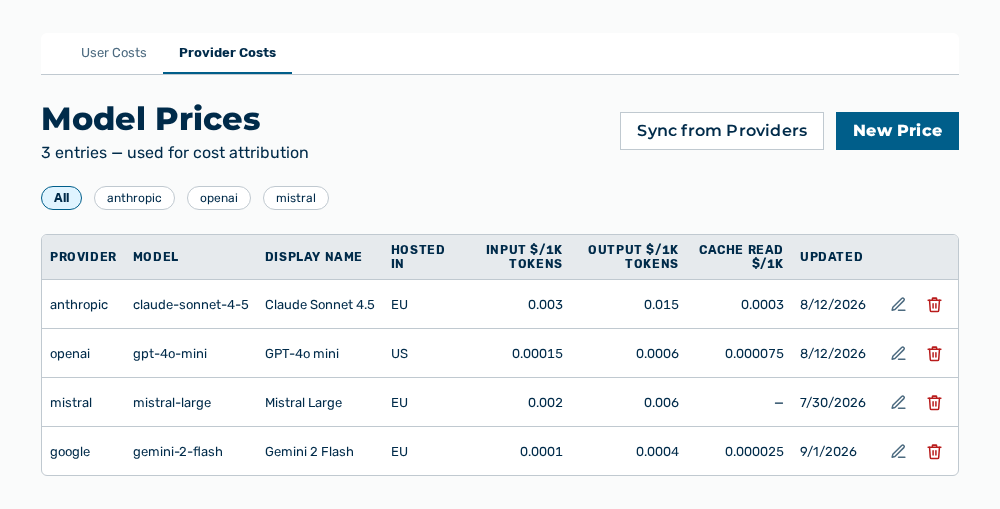
Model prices view with the new entry
Effects of the new model price
The new model price has the following effects:
| Object | Effect |
|---|---|
| Cost attribution | Myra AI Workspace rates the following requests to this model with the prices entered. Costs already recorded do not change. |
| Costs view | The view reports the costs of this model per tenant, user account, and gateway. |
| Provider Costs tab | The entry appears in the list. The subtitle reports the count increased by the entry. |
Note
The prices are per 1,000 tokens. Providers usually publish their prices per 1,000,000 tokens. Divide their figure by 1,000. For the linkup/web_search row the price is per query. The Input $/1K tokens field carries the price per 1,000 queries, and the Output $/1K tokens field stays at 0.
Editing a model price
Proceed as follows to edit a model price:
Model Prices view
-
► In the Settings area, open the Costs group.
- ▷ On the start page, click on your name at the bottom of the navigation bar.
- ↳ The user menu opens.
User menu
- ▷ In the My Account group, click on the Settings entry.
- ↳ The navigation bar shows the Settings area.
Navigation bar in the Settings area
- ▷ In the navigation bar, click on the Costs group.
- ► Open the Provider Costs tab.
- ► In the row of the entry, select Edit.
- ↳ The Edit:
/ dialog opens.
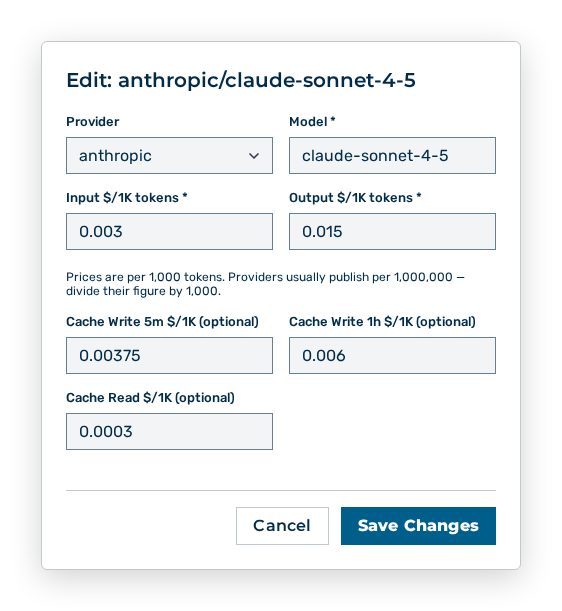
Edit dialog
- ► Change the prices.
- ► Click on the Save Changes button.
- ➔ Myra AI Workspace uses the new prices for the cost allocation that follows.
Model prices view
Effects of the changed prices
The change has the following effects:
| Object | Effect |
|---|---|
| Cost attribution | Myra AI Workspace rates the following requests with the new prices. Costs already recorded keep the prices that applied at the time of the request. |
| Updated column | The column carries the time of the change. |
| Budget and limits | A higher price uses up the budget of a tenant faster, a lower price slower. |
Note
The Provider and Model entries are locked in the Edit dialog. To assign an entry to a different model, delete it and create it again.
Deleting a model price
Proceed as follows to delete a model price:
Model Prices view
-
► In the Settings area, open the Costs group.
- ▷ On the start page, click on your name at the bottom of the navigation bar.
- ↳ The user menu opens.
User menu
- ▷ In the My Account group, click on the Settings entry.
- ↳ The navigation bar shows the Settings area.
Navigation bar in the Settings area
- ▷ In the navigation bar, click on the Costs group.
- ► Open the Provider Costs tab.
- ► In the row of the entry, select Delete.
- ↳ The Delete pricing for
/ query opens.?
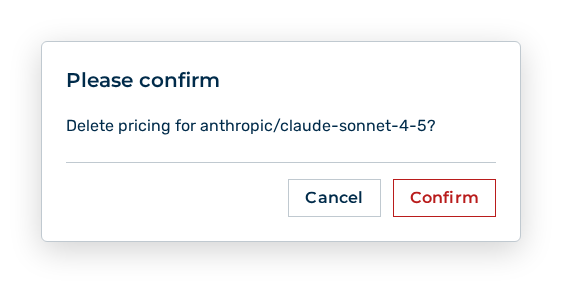
Delete pricing query
- ► Confirm the query.
- ➔ Myra AI Workspace removes the entry.
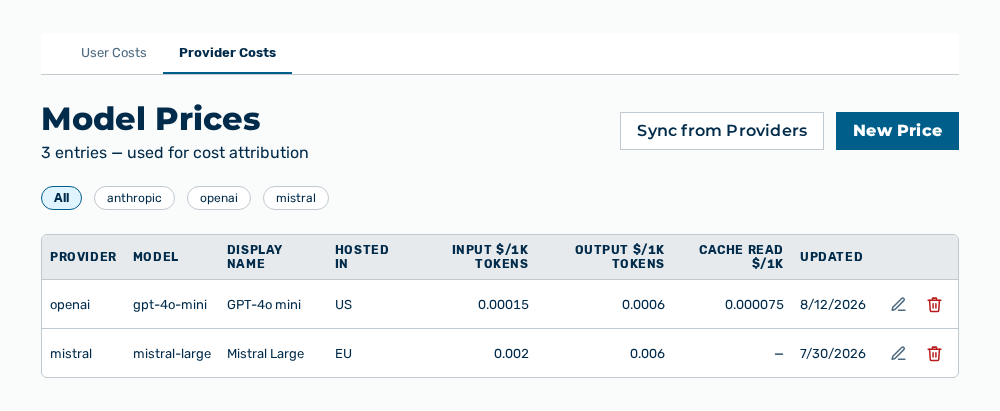
Model prices view without the entry
Effects of deleting a model price
The deletion has the following effects:
| Object | Effect |
|---|---|
| Model price | Myra AI Workspace removes the entry from the Provider Costs tab. No price is available for this model any more. |
| Cost attribution | The following requests to this model no longer get costs attributed. Costs already recorded remain. |
| Model | The model itself remains usable. The model price controls the cost attribution only. |
Note
The Sync from Providers button creates a deleted entry again as soon as the provider still lists the model.
Note
These tasks need the Manage model prices and deprecations permission of the Platform module. The permission stays reserved for the Administrator role. A role of your own does not take the permission.