Recent chats
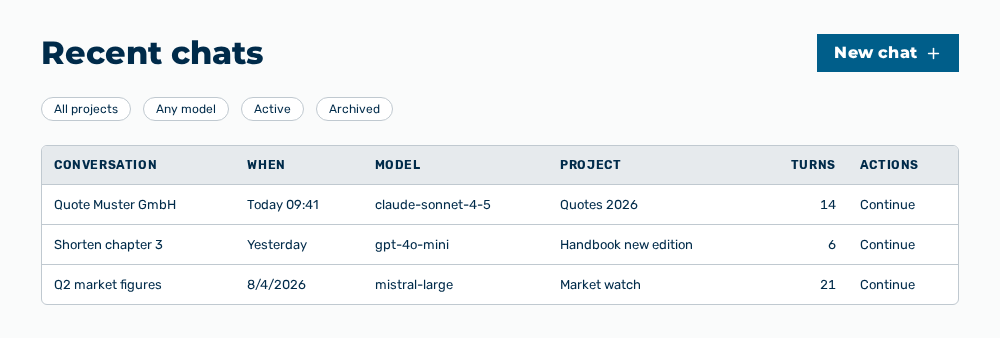
Recent chats view
The Recent chats view shows all your previous conversations, newest first. You continue a conversation or open its project.
The following information is available:
| Column | Description |
|---|---|
| Conversation | Title of the conversation as a link. A click on the link opens the conversation. If the conversation does not carry a title yet, the column shows Untitled chat. |
| When | Time of the last change. On the same day the column shows Today , on the previous day Yesterday, within the last seven days |
| Model | Model the conversation last used. If no model is stored, the column shows —. |
| Project | Project the conversation belongs to. If the conversation belongs to no project, or the name of the project cannot be resolved, the column shows —. |
| Turns | Number of exchanges in the conversation. As long as the list does not supply the number, the column shows —. |
| Actions | Row actions of the conversation. The following table lists them. |
The following options are available:
| Option | Description |
|---|---|
| New chat button | Opens a new conversation. If you opened the view from a project, the button carries the label New project chat and the new conversation belongs to that project. |
| Search conversations… input field | Searches the conversations. In the Active view, Myra AI Workspace searches on the server from two characters on and therefore also in the content of the conversations. In the Archived view, the search filters the rows already loaded by title, model, and project. |
| All projects drop-down list | Shows the conversations of the selected project only. The drop-down list carries the projects of the loaded conversations. |
| Any model drop-down list | Shows the conversations of the selected model only. The drop-down list carries the models of the loaded conversations. |
| Status drop-down list | Switches between Active and Archived. The Archived view carries its own list with its own load-more. The Archive row action is replaced by Restore there. |
| Continue row action | Opens the conversation and continues it. |
| Share to project feed row action | Makes the conversation visible in the feed of its project. Myra AI Workspace reports Shared to project feed. The row action appears for a conversation that belongs to a project only, and not in the Archived view. |
| Remove from project feed row action | Takes the conversation back out of the feed of its project. Myra AI Workspace reports Removed from project feed. The row action takes the place of Share to project feed as soon as the conversation is shared. |
| Rename row action | Replaces the title in the row with an input field. The title holds 255 characters at most. The Enter key applies the title, the Esc key discards the change. |
| Archive row action | Takes the conversation out of the Active view. The conversation is available in the Archived view afterwards. |
| Restore row action | Brings the archived conversation back into the Active view. The row action appears in the Archived view only. |
| Delete row action | Opens the Delete this conversation? This can't be undone. confirmation. After the confirmation, Myra AI Workspace removes the conversation from every list. |
| Load more button | Loads the next page of the list. The button appears only while further conversations are available. While loading, it carries the label Loading…. |
Note
A dot behind the title marks a new scheduled result that you have not opened yet. The dot carries the note New scheduled result and disappears as soon as you open the conversation.
Note
If no conversation exists yet, the view shows No conversations yet. In the Archived view it shows No archived conversations. If a search or a filter returns no result, the view shows No matches.
Note
If the list cannot be loaded, the view shows Couldn't load your chats. and offers the Retry button. If the search fails, the view shows Search failed. Please try again. with the Retry button as well. If the load-more fails, the button carries the label Couldn't load more — retry.