Playground
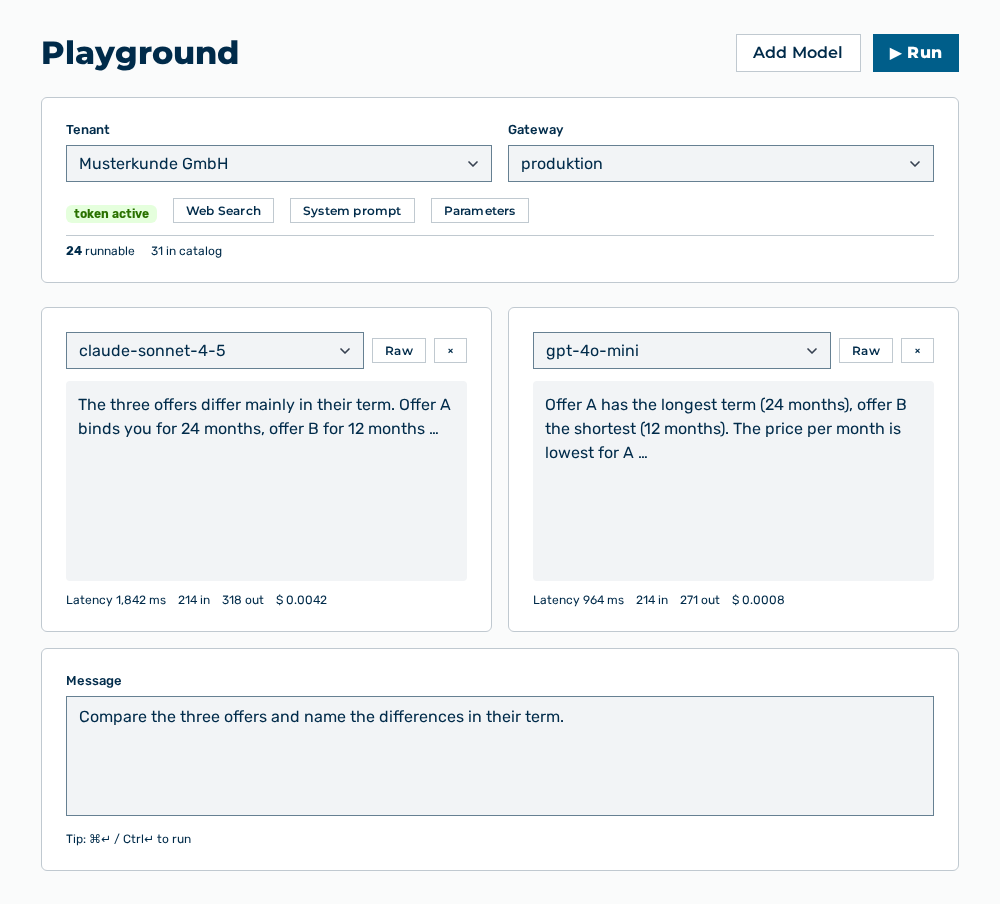
Playground view
The Playground view runs a prompt against one or more models and presents the answers side by side. The header names the Tenant, the Gateway, and the token active state.
The following information is available per model panel:
| Entry | Description |
|---|---|
| Response | Answer of the model. While the run lasts, Running… appears there. Without a result, (empty response) appears there. |
| Latency, Input tokens, Output tokens, Cache write tokens, Cache read tokens, and Estimated cost | Metrics of the run. |
The following options are available:
| Option | Description |
|---|---|
| Add Model button | Adds another model panel. The selection list names the number of the models as |
| System prompt button | Shows the input field of the system prompt. After that, the button carries the Hide system label. The restore default link resets the text. |
| Parameters button | Shows the Temperature slider. After that, the button carries the Hide params label. |
| Web Search button | Enables the web search for the run. After that, the button carries the Web Search ON label. |
| Message input field | Message that is sent to the models. The Tip: ⌘↵ / Ctrl↵ to run hint names the key combination. |
| ▶ Run button | Starts the run. During the run, the button carries the Running… label. |
| Show raw button | Shows the answer unformatted. After that, the button carries the Show rendered label. |
| Remove panel icon | Removes the model panel. |
Note
If you open a link that the model produced, then the playground reports You are leaving this tool with the This link was generated by an AI model. You are solely responsible for any site you choose to visit. hint and the Open link → button. If no gateway is selected, then the view reports No active gateway token. Select a gateway first.