Sessions tab
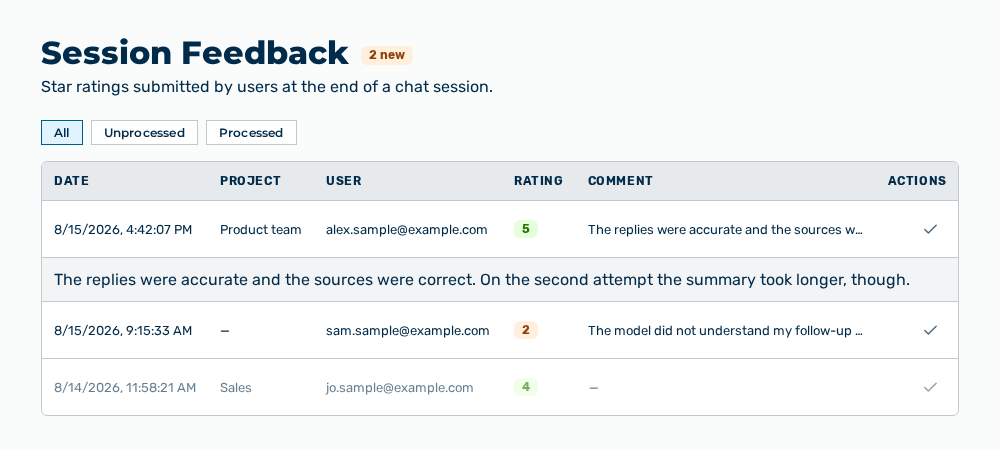
Sessions tab
The tab carries this note: Star ratings submitted by users at the end of a chat session. The heading carries the
The following information is available:
| Column | Description |
|---|---|
| Date | Time at which the rating was submitted. |
| Project | Project of the conversation. Without a project, the column shows —. |
| User | Email address of the person who rated. Without an address, the column shows —. |
| Rating | Grade from 1 to 5, where 5 is the best grade. Myra AI Workspace highlights a high grade in green and a low grade in red. |
| Comment | Text of the rating, shown truncated. Without a text, the column shows —. |
| Actions | Row action that sets the processing state. |
The following options are available:
| Option | Description |
|---|---|
| All, Unprocessed, Processed buttons | Limit the list to one processing state. |
| Row of the table | Expands the complete comment and collapses it again. A row without a comment does not expand. |
| Mark as processed row action | Marks the rating as processed. For a rating processed already, the row action shows Mark as unprocessed. |
Note
If no rating exists, the tab shows No session feedback yet. If the load or the marking fails, the tab shows Failed to load feedback. or Failed to update the feedback entry.