Vouchers
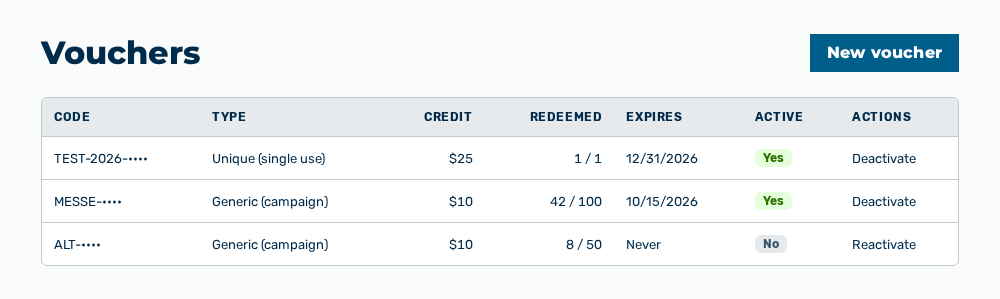
Vouchers view
The Vouchers view manages redeemable codes. A code grants a new signup a one-time trial credit in US dollars.
The following information is available:
| Column | Description |
|---|---|
| Code | Character string that the signup redeems, for example TRIAL-2026. |
| Type | Kind of the code: Generic (campaign) for a code with several redemptions or Unique (single use) for a code with exactly one redemption. |
| Credit | Trial credit in US dollars that the redemption grants, for example $50. |
| Redeemed | Number of the redemptions in relation to the maximum number, for example 12 / 1000. |
| Expires | Date up to which the code can be redeemed. If no date is stored, then the column shows Never. |
| Active | Redeemability of the code: Yes or No. |
| Actions | Row actions of the code. |
The following options are available:
| Option | Description |
|---|---|
| New voucher button | Opens the New voucher dialog. |
| Deactivate row action | Opens the Deactivate voucher ? It can no longer be redeemed. prompt. After the confirmation, the code shows No in the Active column. |
| Reactivate row action | Opens the Reactivate voucher ? prompt. After the confirmation, the code can be redeemed again. The row action appears only for a deactivated code. |
Entries in the New voucher dialog
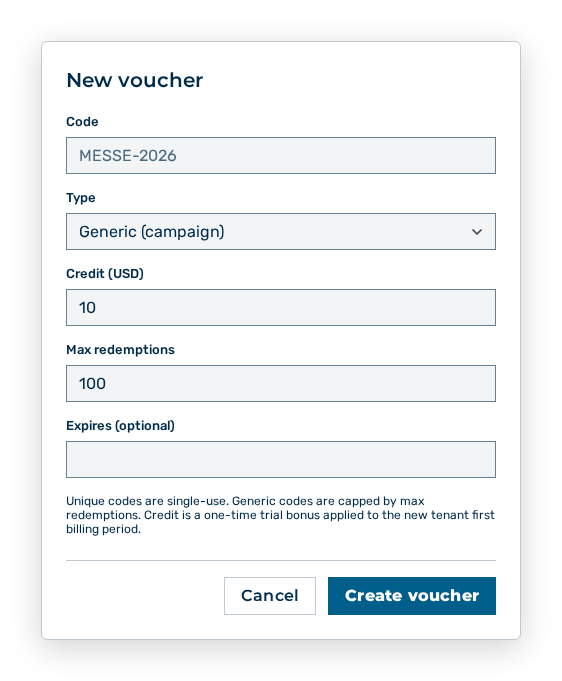
New voucher dialog
You define the following entries during the creation:
| Entry | Description |
|---|---|
| Code * | Character string that the signup enters, for example TRIAL-2026. The entry is required. |
| Type | Kind of the code: Generic (campaign) or Unique (single use). Unique codes are single-use. The maximum number of the redemptions limits generic codes. |
| Credit (USD) * | Trial credit in US dollars, for example 50. Myra AI Workspace applies the credit once in the first billing period of the new tenant. The entry is required. |
| Max redemptions | Maximum number of the redemptions of a generic code, for example 1000. The value must be a whole number of at least 1. |
| Expires (optional) | Last day on which the code can be redeemed. If you leave the field empty, then the code does not expire. |
The following options are available in the dialog:
| Option | Description |
|---|---|
| Create voucher button | Creates the voucher. During the creation, the button carries the Creating... label. |
| Cancel button | Closes the dialog without creating the voucher. |
Note
If no voucher exists, then the view reports No vouchers yet. If the loading fails, then the view reports Failed to load vouchers.
Note
The view needs the Manage vouchers permission of the Platform module. This permission stays reserved for the Administrator role. A role of your own does not take it.