Reports tab
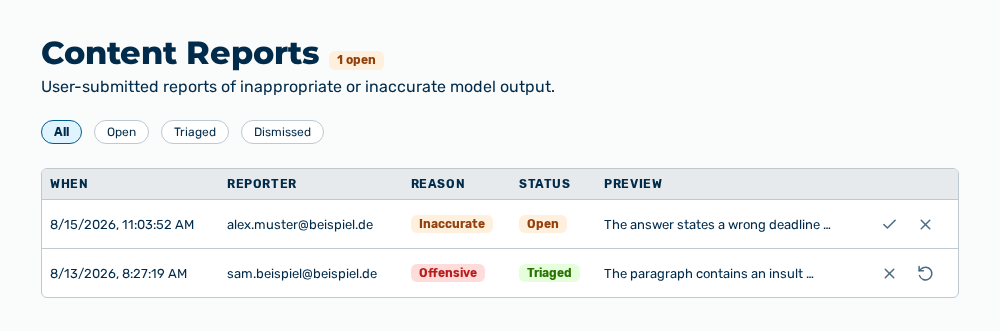
Reports tab
The tab carries this note: User-submitted reports of inappropriate or inaccurate model output. The heading carries the
The following information is available:
| Column | Description |
|---|---|
| When | Time at which the report came in. |
| Reporter | Email address of the person who reported. Without an address, the column shows —. |
| Reason | Offensive, Unsafe advice, Inaccurate, or Other. |
| Status | Open, Triaged, or Dismissed. |
| Preview | First 120 characters of the message reported. A longer text ends with three dots. |
The following options are available:
| Option | Description |
|---|---|
| All, Open, Triaged, Dismissed buttons | Limit the list to one status. |
| Row of the table | Expands the details of the report and collapses them again. |
| Mark triaged row action | Sets the status to Triaged. The row action does not appear for a report triaged already. |
| Dismiss row action | Sets the status to Dismissed. The row action does not appear for a report dismissed already. |
| Reopen row action | Sets the status to Open. The row action does not appear for a report that is open already. |
The row expanded contains the following information:
| Entry | Description |
|---|---|
| Reporter notes | Text that the person who reported entered. The entry appears only if a note is available. |
| Reported message | Complete text of the model output reported. Without a text, the entry shows (empty). |
| ID: | ID of the report. After it, Message: and Conversation: show the IDs of the message and the conversation, if they are available. |
Note
If no report exists, the tab shows No reports yet. With a filter set, it shows No reports with status “