Custom roles
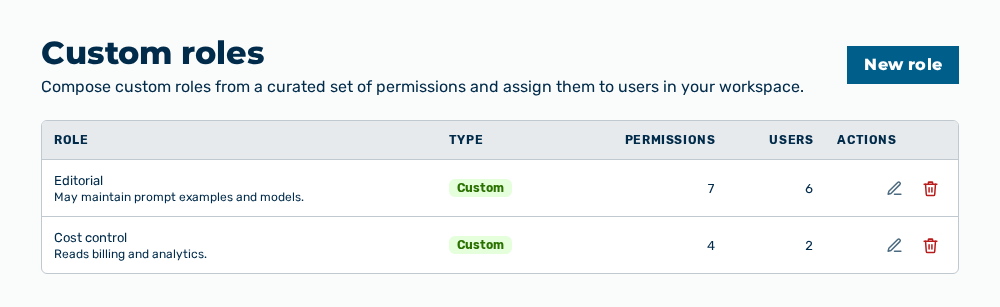
Custom roles view
The Custom roles view composes custom roles from a curated set of permissions and assigns them to users in the workspace. The subtitle is Compose custom roles from a curated set of permissions and assign them to users in your workspace. The system roles of Myra are shown by the Roles & permissions view.
The following information is available:
| Column | Description |
|---|---|
| Role | Name of the role with its description. |
| Type | Origin of the role. Every row of this view carries the Custom badge. |
| Permissions | Number of the permissions that the role grants. |
| Users | Number of the user accounts that the role is assigned to. |
| Actions | Holds the actions of the row. |
The following options are available:
| Option | Description |
|---|---|
| New role button | Opens the New role dialog. See the Creating a role section. |
| Edit row action | Opens the Edit NAME dialog. See the Editing a role section. |
| Delete row action | Deletes the role after the Delete the role NAME? Its permissions and every user assignment are removed with it. confirmation. |
The editor groups the permissions into modules:
- ■ Agents
- ■ Analytics
- ■ Approvals
- ■ Billing
- ■ Model catalog
- ■ Gateways
- ■ Governance
- ■ Groups
- ■ Connectors
- ■ Projects
- ■ Roles
- ■ Scheduled tasks
- ■ SSO
- ■ Workspace
- ■ Users
- ■ Workflows
Note
A permission that your own user account does not hold cannot be granted. The editor shows it as not grantable and gives You do not hold KEY, so you cannot grant it. If no custom role exists yet, the view shows No custom roles yet. Create one to grant a tailored set of permissions. If the permission catalog does not load, the view shows The permission catalog could not be loaded, so creating and editing roles is unavailable. Please reload the page. The New role button and the Edit row action are then unavailable.