Plans
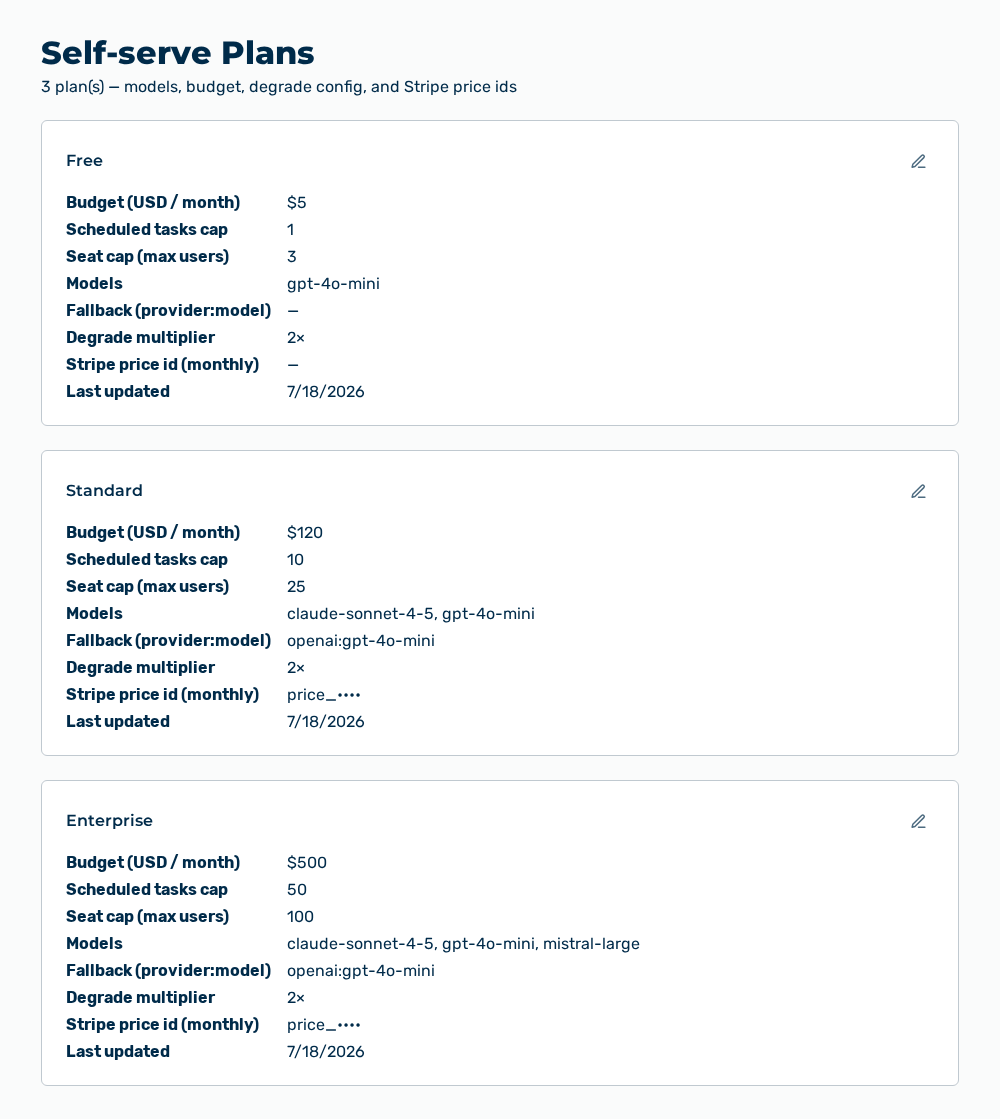
Self-serve Plans view
The Self-serve Plans view manages the plans of the self-registration. A plan defines the available models, the budget, the degrade configuration, and the Stripe price id. The view shows every plan as an area of its own. The subtitle names the number of the plans.
The following information is available per plan area:
| Entry | Description |
|---|---|
| Area title | Name of the plan, for example free, standard, or enterprise. |
| Budget (USD / month) | Spending limit of a tenant of this plan per month. |
| Scheduled tasks cap | Maximum number of the scheduled tasks that a tenant of this plan holds. |
| Seat cap (max users) | Maximum number of the user accounts of a tenant of this plan. |
| Models | Model ids that the plan releases. If no model id is stored, then the area shows —. |
| Efficient models (over-cap subset) | Model ids that remain available after the budget is reached. |
| Fallback (provider:model) | Model that Myra AI Workspace uses if the selected model does not respond. |
| Degrade provider and Degrade model | Provider and model that Myra AI Workspace degrades to above the budget. |
| Degrade multiplier | Multiple of the budget from which the degrade applies, for example 1.5×. |
| Stripe price id (monthly) and Stripe price id (annual) | Price ids with which Stripe bills the plan. |
| Last updated | Time of the last change of the plan. |
The following options are available:
| Option | Description |
|---|---|
| Edit row action | Opens the Edit plan: |
Entries in the Edit plan dialog
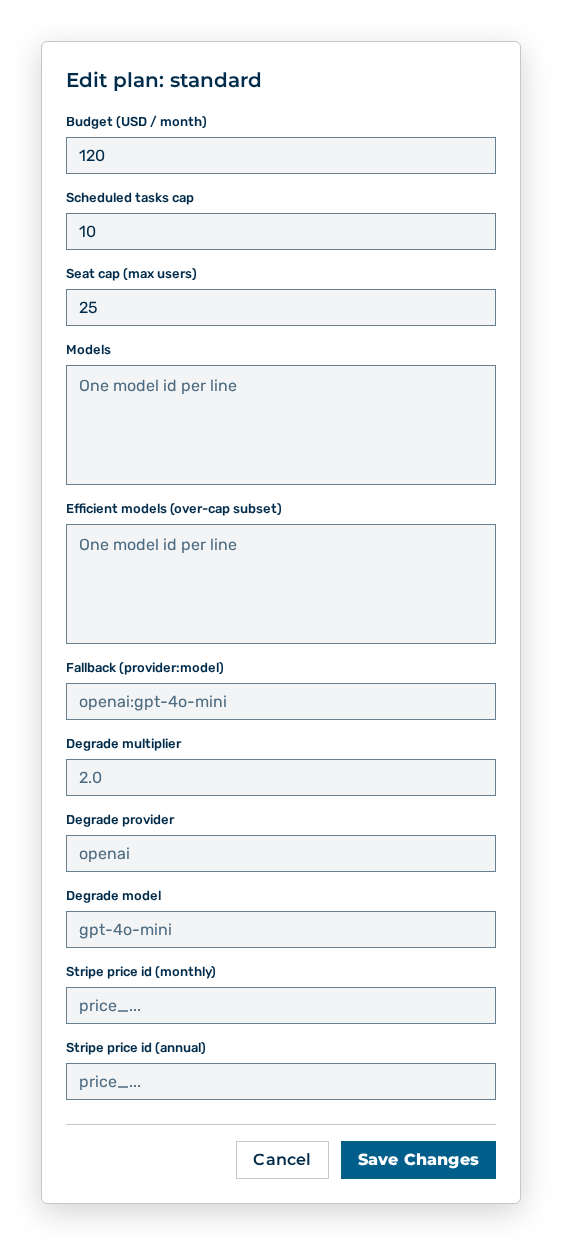
Edit plan dialog
You change the following entries in the dialog:
| Entry | Effect of the change |
|---|---|
| Budget (USD / month) | Changes the monthly spending limit. The value must be a number greater than or equal to 0. |
| Scheduled tasks cap | Changes the maximum number of the scheduled tasks. The value must be a whole number of at least 1. |
| Seat cap (max users) | Changes the maximum number of the user accounts. The value must be a whole number between 1 and 10000. |
| Models | Defines the released models, one model id per line. Removed models are no longer available to the tenants of this plan. |
| Efficient models (over-cap subset) | Defines the models that still respond above the budget, one model id per line. |
| Fallback (provider:model) | Defines the replacement model. The value must be in the form provider:model, for example openai:gpt-4o-mini. If you leave the field empty, then the fallback is disabled. |
| Degrade multiplier | Defines the multiple of the budget from which Myra AI Workspace degrades. The value must be greater than 1.0 and at most 10.0. If you leave the field empty, then the degrade is disabled. |
| Degrade provider and Degrade model | Define the provider and the model of the degrade. Enter both entries or leave both empty. |
| Stripe price id (monthly) and Stripe price id (annual) | Change the price ids of the billing. |
The following options are available in the dialog:
| Option | Description |
|---|---|
| Save Changes button | Applies the changes. During the saving, the button carries the Saving… label. |
| Cancel button | Closes the dialog without applying the changes. |
Note
If another person is editing the same plan at that moment, then the dialog reports Another plan edit is in progress. Please retry in a moment. The view is available only to user accounts with the Manage plan and entitlement config permission.
Note
The view needs the Manage plan and entitlement config permission of the Platform module. This permission stays reserved for the Administrator role. A role of your own does not take it.