Personal tab
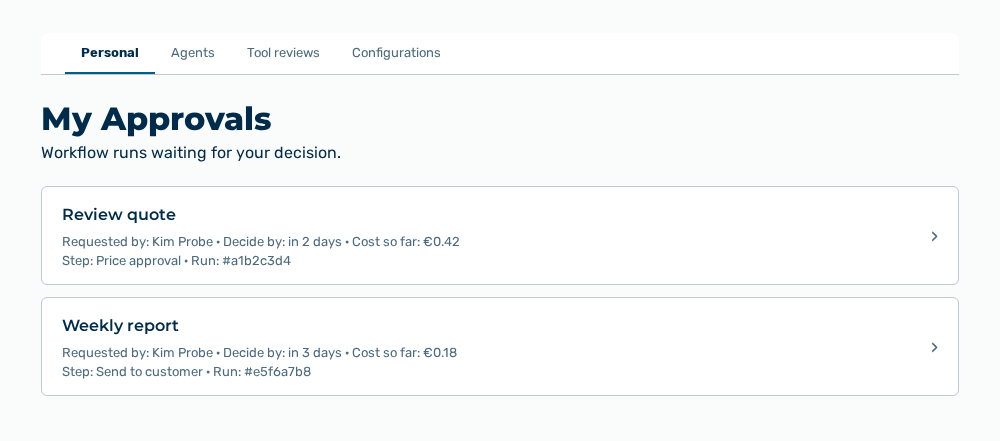
Personal tab
The tab carries this note: Workflow runs waiting for your decision. The tab lists each waiting run as an entry of its own.
The following information is available for each entry:
| Entry | Description |
|---|---|
| Name of the workflow | Workflow whose run waits for your decision. The name is in the first line of the entry. |
| Requested by | Person who started the run. Without a name, the email address appears, otherwise —. |
| Decide by | Time left until the approval expires, for example in 3 hours. The point in time appears as a hint when you point at the entry. Without a deadline, the entry shows —. |
| Cost so far | Costs that the run caused up to the approval step. |
| Step | Name of the approval step in the workflow. The technical key appears as a hint when you point at the entry. |
| Run | Short form of the run ID with a leading number sign, for example #a1b2c3d4. The complete ID appears as a hint when you point at the entry. |
The following option is available:
| Option | Description |
|---|---|
| Entry of the list | Opens the Approve this workflow run? page. |
Note
If no approval waits for you, the view shows You have no approvals waiting. If the list cannot be loaded, the view shows Could not load your approvals.
Note
The list contains only the runs in which you are the named approver. A run for which another person decides does not appear here.