Projects
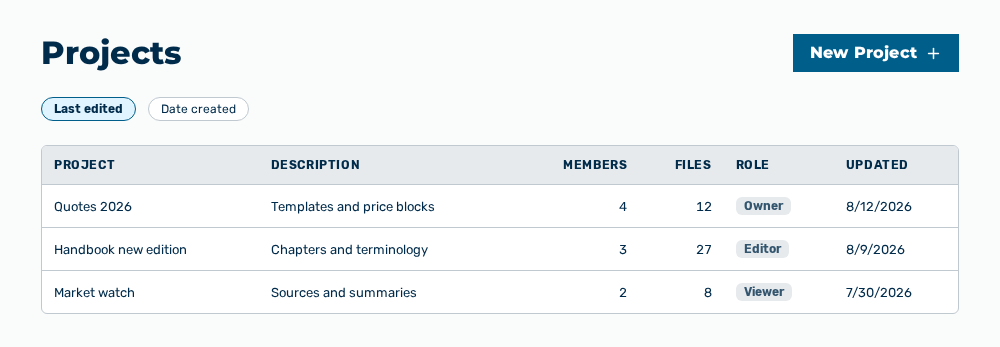
Projects view
The Projects view bundles related chats, knowledge files, and custom instructions so the AI shares the same context across a body of work. The view lists the projects that you created and the projects that other users added you to.
The following information is available:
| Column | Description |
|---|---|
| Project | Name of the project with its icon and its color. If a project has no name, the Untitled entry appears. |
| Description | Short description of the project. The column stays empty if no description was entered at creation. |
| Members | Number of the users who have access to the project. |
| Files | Number of the knowledge files of the project. The column counts only the files you can see. Some may be private to their creator until a chat is shared. |
| Role | Your role in this project: Owner, Editor, or Viewer. |
| Updated | Time of the last change to the project. |
The following options are available:
| Option | Description |
|---|---|
| New Project button | Opens the New Project dialog. See the Creating a project section. |
| Search projects… field | Limits the list to the projects whose name or description contains the text entered. |
| All filter | Shows all projects that you have access to. |
| Owner filter | Shows only the projects in which you have the Owner role. |
| Editor filter | Shows only the projects in which you have the Editor role. |
| Viewer filter | Shows only the projects in which you have the Viewer role. |
| Sort by list | Sorts the list by Recent Activity, Last edited, or Date created. |
| Open button | Opens the detail view of the project in the row. |
| Create your first project link | Appears only for an empty list and opens the New Project dialog. |
Note
If no project exists yet, the view shows No projects yet. If the search finds no project, the view shows No projects match your search.
The following sections describe the view in detail: