Detail view of an agent
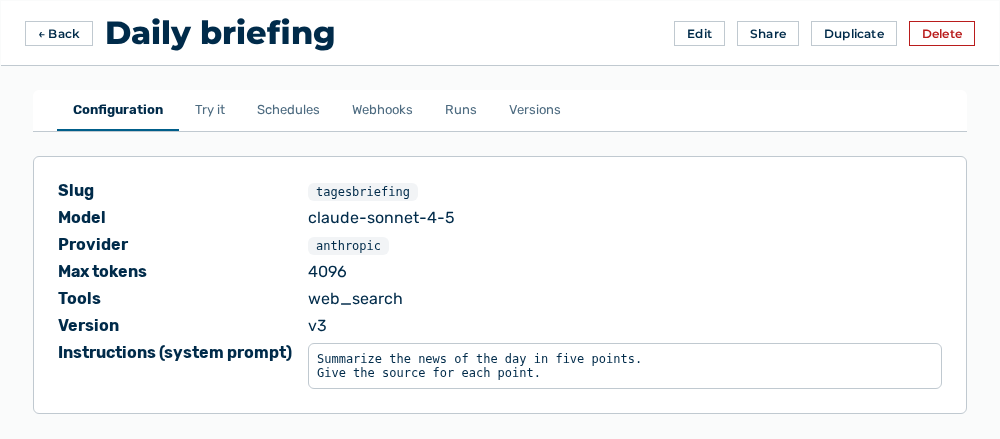
Detail view of an agent
The detail view opens when you select the Open row action in the list. The header names the name of the agent and the access level in the Access tier:
The following tabs are available:
| Tab | Description |
|---|---|
| Configuration | Shows Slug, Provider, Max tokens, Tools, Version, Instructions (system prompt) and, for an imported agent, Imported from. If a provider is pinned, then the entry reads Pinned: runs on |
| Try it | Runs the agent with an input. The input field carries the Input label, and the Run button starts the run. Below the result, the view names the trace in the Trace: |
| Schedules | Lists the schedules with the Name, Cadence, Enabled, Delivery, and Next run columns. |
| Webhooks | Lists the webhook triggers with the Name, URL, Enabled, and Last fired columns. The introduction reads Let an external system trigger this agent by POSTing to a unique URL. Each trigger has its own secret; the run executes as the agent's owner. |
| Runs | Lists the previous runs with the Status, When, HTTP, Version, and Delivery columns. The status is Running, Succeeded, or Failed. |
| Versions | Lists the versions with the Version, Name, Model, and Created columns. The running version carries the Current label. |
The following options are available in the Runs tab:
| Option | Description |
|---|---|
| Entry of a run | Opens the Run detail panel with the Result, Steps, Cost & tokens areas — with the Cost, Input tokens, Output tokens, and Cache tokens values — as well as Agent config at run time and the Delivery entry. |
Note
The delivery of a run is Pending, Delivered, Delivery failed, Skipped (empty), Blocked (PII), Blocked (unsafe URL), Blocked (not allowlisted), Blocked (destination changed), Awaiting approval, Delivering, Denied, or Approval expired. If the PII policy blocks the delivery, then the view names the possible remedies under What you can do:. If the agent holds no model, then the view reports This agent has no model configured and cannot run. Edit it and choose a model.