Chat Integrations tab
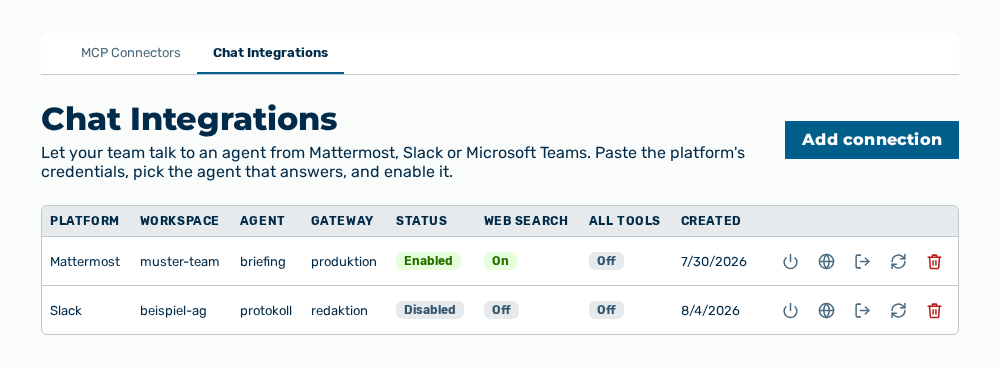
Chat Integrations tab
The tab lists the chat connections of the tenant. The tab carries the note Let your team talk to an agent from Mattermost, Slack or Microsoft Teams. Paste the platform's credentials, pick the agent that answers, and enable it.
The following information is available:
| Column | Description |
|---|---|
| Platform | Chat platform of the connection: Mattermost, Slack, or Microsoft Teams. |
| Workspace | Identifier of the workspace on the platform, for example the Mattermost team ID, the Slack team ID, or the Entra tenant ID. |
| Agent | Agent that answers the messages from the chat. |
| Gateway | Gateway through which the connection bills and enforces its requests. |
| Status | Enabled if the bot answers, otherwise Disabled. |
| Web search | On if the bot may search the web for its answers, otherwise Off. |
| All tools | On if the bot may use the full toolset of its agent, otherwise Off. |
| Created | Date on which the connection was created. |
The following options are available:
| Option | Description |
|---|---|
| Add connection button | Opens the Add chat connection dialog. |
| Enable row action | Switches the bot on. The row action appears while the status is Disabled. |
| Disable row action | Switches the bot off. The bot then stops answering, but the connection stays. |
| Enable web search row action | Lets the bot search the web for its answers. |
| Disable web search row action | Takes the web search away from the bot. |
| Enable all tools row action | Gives the bot the full toolset of its agent, that is running code, fetching URLs, MCP connectors, and image generation. |
| Disable all tools row action | Takes the tools away from the bot, except the web search. |
| Rotate token row action | Opens the Rotate bot token dialog. |
| Delete row action | Opens the Delete this chat connection? The bot will stop answering and its access token is revoked. confirmation. |
Note
If no chat connection exists yet, the tab shows No chat connections yet.
Note
The tools run under the credentials of the person who owns the bot, and anyone in the chat workspace triggers them. Enable All tools only if you trust every member of this channel.