Agents tab
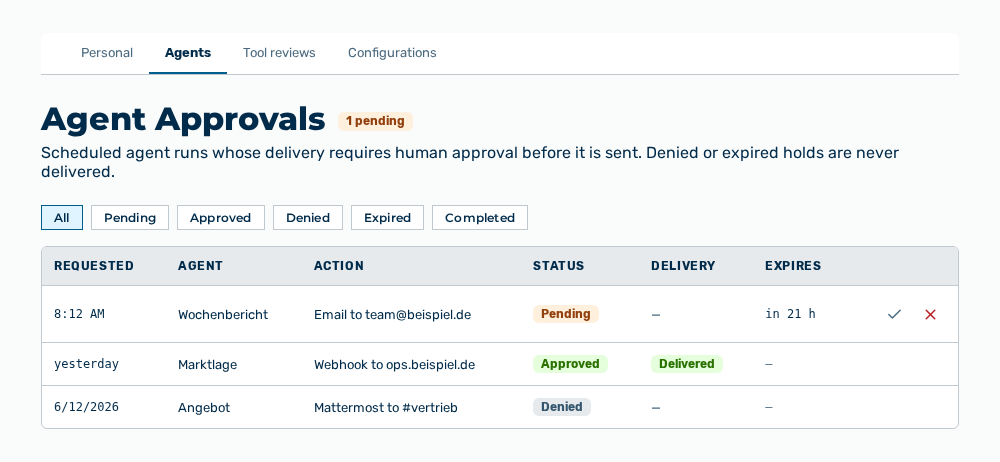
Agents tab
The tab carries this note: Scheduled agent runs whose delivery requires human approval before it is sent. Denied or expired holds are never delivered.
The following information is available:
| Column | Description |
|---|---|
| Requested | Time at which the run requested the approval. |
| Agent | Name of the agent. Without a name, the technical key of the agent appears. |
| Action | Short description of the delivery, for example the dispatch by email, webhook, or Mattermost. |
| Status | Pending, Approved, Denied, Expired, or Completed. |
| Delivery | State of the delivery after the decision. While no state is available, the column shows —. |
| Expires | Time at which the approval expires. For an approval decided already, the column shows —. |
The following options are available:
| Option | Description |
|---|---|
| All, Pending, Approved, Denied, Expired, Completed buttons | Limit the list to one status. |
| Approve row action | Approves the delivery. The scheduler delivers it on its next run and re-checks each egress gate. |
| Deny row action | Denies the delivery. Myra AI Workspace never delivers it. |
Note
The row actions are available for a pending approval only. A pending approval that nobody decides within 24 hours expires and counts as denied.
Note
The heading carries the