Gateways
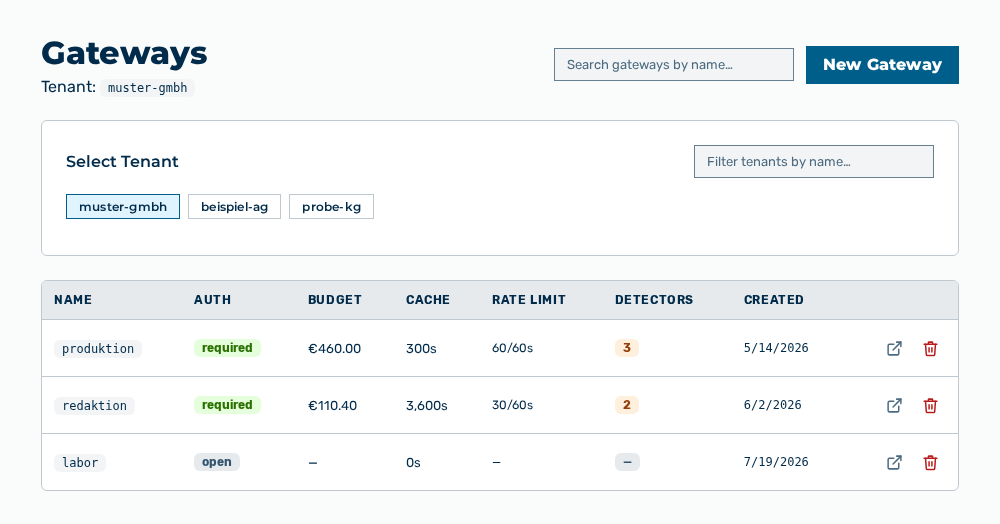
Gateways view
The Gateways view manages the named installations of a tenant. A gateway sets which providers and models are available, which rules apply to the content, which budget applies, and which authentication tokens get access. Above the list, the Tenant: entry names the tenant whose gateways the view lists.
The following information is available:
| Column | Description |
|---|---|
| Name | Identifier of the gateway. The identifier contains lowercase letters, numbers, and hyphens, and is part of the endpoint URL. |
| Auth | Shows whether a request to the gateway must carry an authentication token: required or open. |
| Budget | Spend cap of the gateway. If no budget is set, the — entry appears. |
| Cache | Lifetime of the cache in seconds. The value 0s means that the cache is disabled. |
| Rate Limit | Permitted requests per time window, in the form |
| Detectors | Number of guardrail detectors that are active on the gateway. If no detector is active, the — entry appears. |
| Created | Time at which the gateway was created. |
The following options are available:
| Option | Description |
|---|---|
| Select Tenant selection list | Selects the tenant whose gateways the view lists. The Filter tenants by name… input field narrows the selection. |
| Search gateways by name… input field | Narrows the list to the gateways whose name contains the text you enter. |
| New Gateway button | Opens the New Gateway dialog. See the Creating a gateway section. |
| Open → row action | Opens the detail view of the gateway in the row. |
| Delete row action | Opens the Delete gateway " |
| Quick start guide link | Appears only when the list is empty and opens the quick start documentation. |
Note
If no gateway exists for the tenant yet, the view shows No gateways for
Note
For the AI Manager and Finance roles, this view is not available. The group does not appear in the Settings area.
The following sections describe the view in detail: