Tool approvals tab
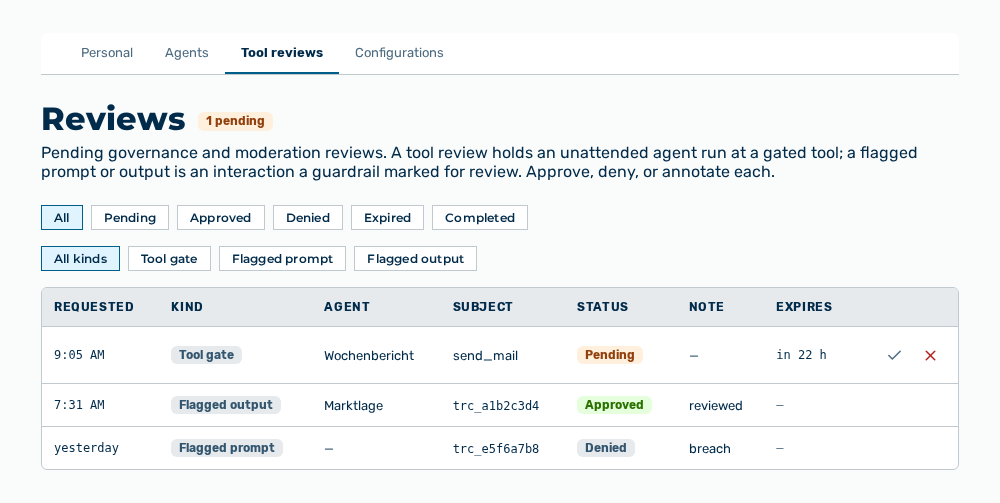
Tool approvals tab
The tab carries this note: Pending governance and moderation reviews. A tool review holds an unattended agent run at a gated tool; a flagged prompt or output is an interaction a guardrail marked for review. Approve, deny, or annotate each.
The following information is available:
| Column | Description |
|---|---|
| Requested | Time at which the review was requested. |
| Kind | Tool gate, Flagged prompt, or Flagged output. |
| Agent | Name of the agent. Without an agent, the column shows —. |
| Subject | For a tool gate, this column gives the names of the gated tools. For a flagged prompt or output, it gives the trace reference of the interaction. |
| Status | Pending, Approved, Denied, Expired, or Completed. |
| Note | Note that the deciding person left. Without a note, the column shows —. |
| Expires | Time at which the review expires. For a review decided already, the column shows —. |
The following options are available:
| Option | Description |
|---|---|
| All, Pending, Approved, Denied, Expired, Completed buttons | Limit the list to one status. |
| All kinds, Tool gate, Flagged prompt, Flagged output buttons | Limit the list to one kind. |
| Approve row action | Opens the Approve review dialog. |
| Deny row action | Opens the Deny review dialog. |
Note
For a flagged prompt or output, the list never shows the text of the interaction, only its trace reference. The reference carries this note: Interaction trace reference — correlate it in Request Logs. You see the content in the Request Logs view, which has its own access controls.
Note
If no review exists, the tab shows No reviews yet. With a filter set, it shows No reviews match the current filters. If the load or the decision fails, the tab shows Could not load reviews. or Could not record the decision.