Request Logs
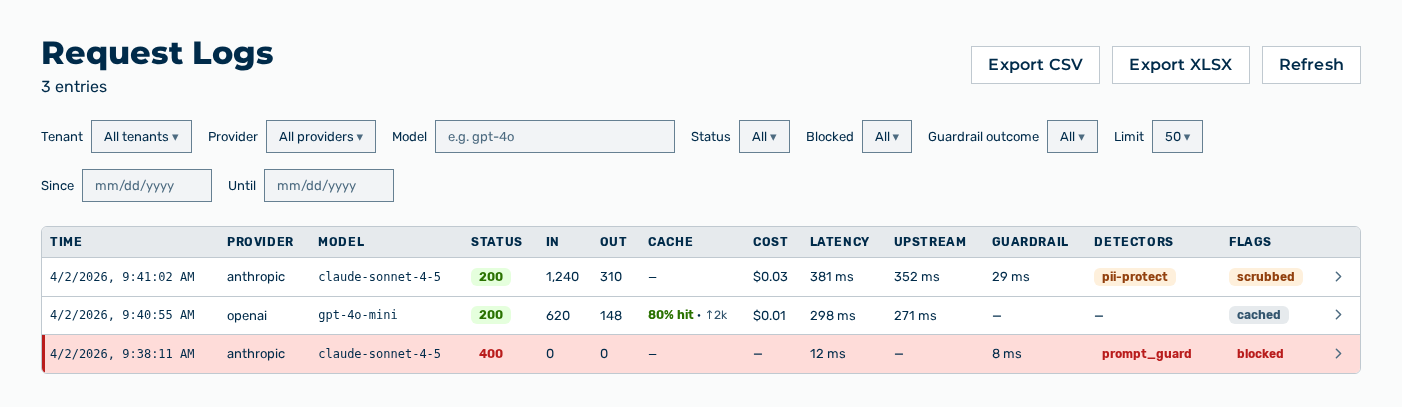
Request Logs view
The Request Logs view records the requests to the gateways and shows the matching trace for every request. The trace names the providers involved, the model used, the tokens, the cost, and the latency. The subtitle names the number of the entries.
The following information is available:
| Column | Description |
|---|---|
| Time | Time at which the gateway received the request. |
| Provider | Provider that answered the request, for example anthropic. |
| Model | Model that answered the request, for example gpt-4o. |
| Status | HTTP status code of the response, for example 200, 401, 429, or 500. |
| In | Number of the input tokens of the request. |
| Out | Number of the output tokens of the response. |
| Cache | Share of the tokens read from the prompt cache, for example 80% hit. The note of the column names the cache write and cache read tokens. |
| Cost | Cost of the request in US dollars. |
| Latency | Total duration of the request in the gateway in milliseconds. |
| Upstream | Duration of the request at the provider in milliseconds. If no duration is available, then the column shows —. |
| Guardrail | Duration of the guardrail check in milliseconds and its verdict. |
| Detectors | Detectors that fired. From the third detector on, the column summarizes the remaining ones as + |
| Flags | Labels of the request: cached, blocked, scrubbed, fallback, and |
The following filters are available:
| Filter | Description |
|---|---|
| Tenant selection list | Restricts the list to one tenant. The All tenants entry removes the filter. |
| Provider selection list | Restricts the list to one provider. The All providers entry removes the filter. |
| Model input field | Restricts the list to one model, for example gpt-4o. |
| Status selection list | Restricts the list to one status code: 200 OK, 400, 401, 429, or 500. |
| Blocked selection list | The Blocked only entry restricts the list to the blocked requests. |
| Guardrail outcome selection list | Restricts the list to one outcome of the guardrails: Any hit, Blocked, Scrubbed, or Flagged. |
| Limit selection list | Maximum number of the loaded entries: 20, 50, 100, or 200. |
| Since and Until input fields | Restrict the list to a period. |
The following options are available:
| Option | Description |
|---|---|
| Refresh button | Loads the list again with the filters set. |
| Export CSV button | Downloads the filtered entries as a CSV file. During the export, the button carries the Exporting… label. |
| Export XLSX button | Downloads the filtered entries as an Excel file. |
| Row of the list | Shows or hides the prompt and the response of the request. |
| View trace icon | Opens the Request Trace area below the list. The icon appears only for a request with a trace. |
Note
For the AI Manager and Finance roles, this view is not available. The group does not appear in the Settings area.
The following sections describe the view in detail: