Detail panel of a tenant
Detail panel of a tenant
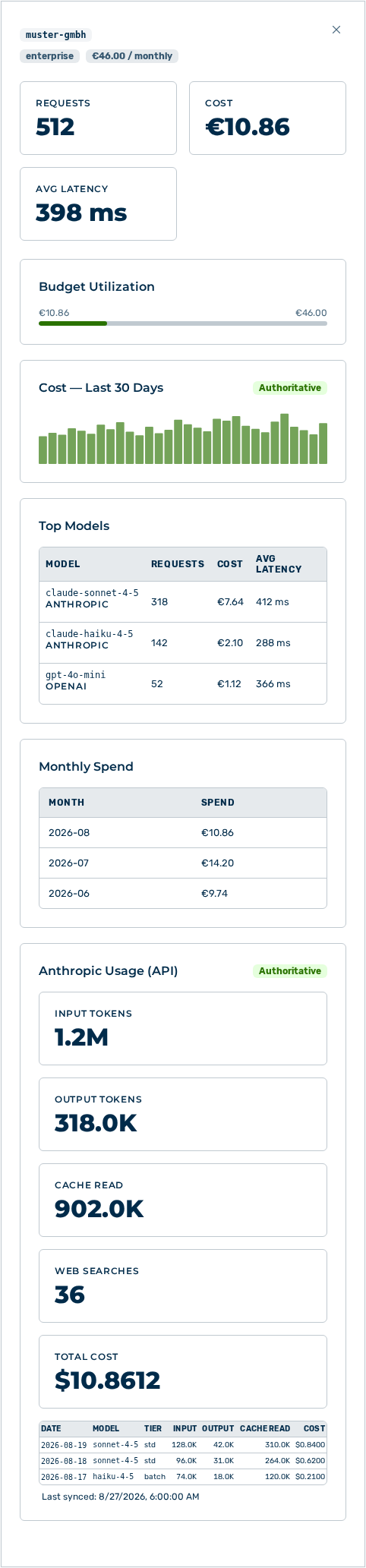
The detail panel opens when you click a row in the By Tenant breakdown. The header names the tenant as well as its plan and its budget with the budget period.
The following information is available:
| Entry | Description |
|---|---|
| Requests, Cost, and Avg Latency | Metrics of the tenant in the selected period. |
| Budget Utilization | Share of the budget consumed. The area appears only for a tenant with a budget. |
| Cost — Last 30 Days | Course of the cost of the last 30 days. |
| Top Models | Most used models with the Model, Requests, Cost, and Avg Latency columns. |
| Monthly Spend | Cost per month with the Month and Spend columns. |
| Anthropic Usage (API) | Usage of the Anthropic API with the Input Tokens, Output Tokens, Cache Read, Web Searches, and Total Cost metrics as well as the Date, Model, Tier, Input, Output, Cache Read, and Cost table columns. The Authoritative label stands for numbers from the provider account, the Estimated label for calculated numbers. |
| Entry Last synced: | Time of the last synchronization with the Anthropic API. Without a synchronization it states never. |
The following options are available in the detail panel:
| Option | Description |
|---|---|
| Close icon | Closes the detail panel. |
Note
If no usage data of the Anthropic API is available yet, then the area reports No usage data yet. Syncs hourly once an admin key is configured.